
Imagine renting an apartment where the plumbing leaks, the electricity constantly cuts out, and the landlord never answers the phone. Would you stay there just because you hate the process of packing boxes?
Of course not. You would move.
Yet, in the digital world, millions of business owners do exactly this. They stay with terrible hosting providers—dealing with slow load times, frequent crashes, and non-existent support—because they are terrified of one thing: Website migration.
The fear is understandable. Your website is your business. The thought of moving files, databases, and emails sounds like a recipe for disaster. What if data gets lost? What if the site goes down for days?
In 2026, these fears are largely outdated. Website migration, when done correctly, is seamless and risk-free. Here is why staying put is costing you money, and how modern migration actually works.
The Hidden Cost of Avoiding Website Migration
Many site owners view their current hosting bill as their only cost. But bad hosting has hidden taxes that bleed your business dry slowly.
If you are delaying a website migration because it seems like a hassle, consider what you are currently paying for:
-
The SEO Tax: Google penalizes slow websites. If your current host can’t deliver fast Time-to-First-Byte (TTFB), your rankings are suffering.
-
The Bounce Rate Tax: Modern users will not wait more than three seconds for a page to load. Every second of delay is a potential customer clicking the “Back” button.
-
The Stress Tax: How much is your peace of mind worth? Worrying if your site will handle a traffic spike is not how you should spend your day.
A website migration isn’t just a technical task; it is a business upgrade that stops these leaks immediately.
Demystifying the Process: How Zero-Downtime Website Migration Works
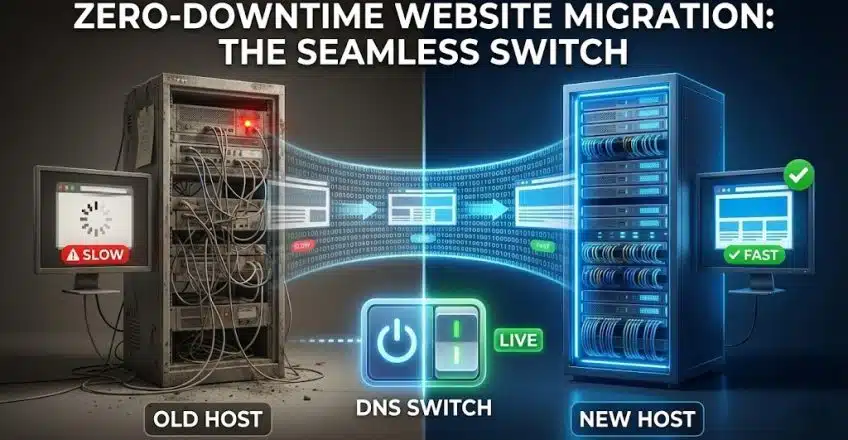
The biggest myth about moving a website is that there is a moment where your site must be “offline” to move the files.
Think of a website migration not as moving a house, but as copying a house.
Step 1: The Clone
You don’t shut down your current live site. Instead, you (or your new host) create an exact duplicate of your files and database on the new server. Your live site remains up and running, taking orders and serving visitors as usual.
Step 2: The Sandbox Test
Before anything goes live, you test the clone on the new server using a temporary URL. Does the checkout work? Are the images loading? This ensures the website migration was perfectly successful without the public ever knowing anything is happening.
Step 3: The Seamless Switch (DNS)
Once the clone is verified, you flip the switch. You update your Domain Name System (DNS) records to point to the new server.
Think of this like forwarding your mail at the post office. For a few hours, some visitors might hit the old house, and some will hit the new house. But because both houses are identical and functional, the user experiences zero downtime.
DIY vs. Managed Website Migration: Don’t Go It Alone
While the concept is simple, the execution requires precision.
There are many WordPress plugins that claim to offer “one-click” migrations. These work fine for small, simple blogs. But for large e-commerce stores or complex sites with massive databases, these plugins often fail midway, leaving you with a corrupted mess.
For a critical business asset, you need a professional touch.
At SternHost, we believe you shouldn’t have to be an IT expert to get better hosting. That is why we offer free, managed website migration serviced by human experts, not just automated scripts. We handle the cloning, the testing, and the switch, ensuring your data is perfectly preserved.
Conclusion: Break Free
Your current web host knows you are afraid to leave. They are banking on your fear of website migration to keep you paying for subpar service.
Don’t be held hostage by technical anxiety. The process is safer, faster, and easier than you think. The only thing you have to lose is your slow loading speeds.
[Ready to upgrade? Contact SternHost today to schedule your free, zero-downtime website migration.]